Showing posts with label Java. Show all posts

How to set java heap size in JavaEE SDK/J2EE SDK/Glassfish/Sun Java System Application Server

Stop the application server, edit
$GLASSFISH_HOME/domains/domain1/config/domain.xml, search for XML element name java-config and jvm-options. For example,

-Xmx512m
-XX:NewRatio=2
-XX:MaxPermSize=128m
...
You can also change these settings in the web-based admin console, typically at http://localhost:4848/, or https://localhost:4848/. Go to Application Server near the top of the left panel, and then on the right panel, click JVM Settings -> JVM Options, and you will see a list of existing JVM options. You can add new ones and modify existing ones there.

Yet another option is to use its Command Line Interface (CLI) tool command, such as:
./asadmin help create-jvm-options
./asadmin help delete-jvm-options
They may be a bit hard to use manually, but are well suited for automated scripts.

What is not possible using java class Inheritance?

1. Private members of the superclass are not inherited by the subclass and can only be indirectly accessed.
2. Members that have default accessibility in the superclass are also not inherited by subclasses in other packages, as these members are only accessible by their simple names in subclasses within the same package as the superclass.
3. Since constructors and initializer blocks are not members of a class, they are not inherited by a subclass.
4. A subclass can extend only one superclass

Compiling and Running an Application in Java

To compile and run the program you need the JDK distributed by Sun Microsystems. The JDK contains documentation, examples, installation instructions, class libraries and packages, and tools. Download an editor like Textpad/EditPlus to type your code. You must save your source code with a .java extension. The name of the file must be the name of the public class contained in the file.

Steps for Saving, compiling and Running a Java

Step 1:Save the program With .java Extension.
Step 2:Compile the file from DOS prompt by typing javac .
Step 3:Successful Compilation, results in creation of .class containing byte code
Step 4:Execute the file by typing java

Java source code

A Java program is a collection of one or more java classes. A Java source file can contain more than one class definition and has a .java extension. Each class definition in a source file is compiled into a separate class file. The name of this compiled file is comprised of the name of the class with .class as an extension. Before we proceed further in this section, I would recommend you to go through the ‘Basic Language Elements’.

Below is a java sample code for the traditional Hello World program. Basically, the idea behind this Hello World program is to learn how to create a program, compile and run it. To create your java source code you can use any editor( Text pad/Edit plus are my favorites) or you can use an IDE like Eclipse.

public class HelloWorld {
    public static void main(String[] args) {
        System.out.println("Hello World");
    }//End of main
}//End of HelloWorld Class


Output
Hello World

ABOUT THE PROGRAM

I created a class named “HelloWorld” containing a simple main function within it. The keyword class specifies that we are defining a class. The name of a public class is spelled exactly as the name of the file (Case Sensitive). All java programs begin execution with the method named main(). main method that gets executed has the following signature : public static void main(String args[]).Declaring this method as public means that it is accessible from outside the class so that the JVM can find it when it looks for the program to start it. It is necessary that the method is declared with return type void (i.e. no arguments are returned from the method). The main method contains a String argument array that can contain the command line arguments. The brackets { and } mark the beginning and ending of the class. The program contains a line ‘System.out.println(”Hello World”);’ that tells the computer to print out on one line of text namely ‘Hello World’. The semi-colon ‘;’ ends the line of code. The double slashes ‘//’ are used for comments that can be used to describe what a source code is doing. Everything to the right of the slashes on the same line does not get compiled, as they are simply the comments in a program.

Java Main method Declarations

class MainExample1 {public static void main(String[] args) {}}
class MainExample2 {public static void main(String []args) {}}
class MainExample3 {public static void main(String args[]) {}}

All the 3 valid main method’s shown above accepts a single String array argument.

Method Overriding in Java with Example

Description :
Method overriding in java means a subclass method overriding a super class method. Superclass method should be non-static. Subclass uses extends keyword to extend the super class. In the example class B is is the sub class and class A is the super class. In overriding methods of both subclass and superclass possess same signatures. Overriding is used in modifying  the methods of the super class. In overriding  return types and constructor parameters of methods should match .

Another way of explanation:
In a class hierarchy, when a method in a subclass has the same name and type signature as a method in its superclass, then the method in the subclass is said to override the method in the superclass. When an overridden method is called from within a subclass, it will always refer to the version of that method defined by the subclass. The version of the method defined by the superclass will be hidden

Method Overriding is achieved when a subclass overrides non-static methods defined in the superclass, following which the new method implementation in the subclass that is executed.

The new method definition must have the same method signature (i.e., method name and parameters) and return type. Only parameter types and return type are chosen as criteria for matching method signature. So if a subclass has its method parameters as final it doesn’t really matter for method overriding scenarios as it still holds true. The new method definition cannot narrow the accessibility of the method, but it can widen it. The new method definition can only specify all or none, or a subset of the exception classes (including their subclasses) specified in the throws clause of the overridden method in the super class


// Method overriding.
class A {
int i, j;
A(int a, int b) {
i = a;
j = b;
}
// display i and j
void test() {
System.out.println("i and j: " + i + " " + j);
}
}

class B extends A {
int k;
B(int a, int b, int c) {
super(a, b);
k = c;
}
// display k – this overrides test() in A
void test() {
System.out.println("k: " + k);
}
}

class Override {
public static void main(String args[]) {
B subOb = new B(1, 2, 3);
subOb.test(); // this calls test() in B
}
}
The output produced by this program is testn here:

k: 3

When test( ) is invoked on an object of type B, the version of test( ) defined within B is used. That is, the versio n of test( ) inside B overrides the version declared in A. If you wish to access the superclass version of an overridden function, you can do so by using super. For example, in this version of B, the superclass version of test( ) is invoked within the subclass' version. This allows all instance variables to be displayed.

Function or Method Overloading in Java with Example

In java the concept of Polymorphism is achieved in two ways:

1. Method Overloading
2. Method Overriding 

In Java it is possible to define two or more methods within the same class that share the same name, as long as their parameter declarations are different.

Here we will discuss only the concept of Method Overloading:
// Demonstrate method overloading.
class MethodOverloadExample {
void overloadsample() {
System.out.println("overloadsample with void";
}
// Overload overloadsample for one integer parameter.
void overloadsample(int a) {
System.out.println("overloadsample with Integer value:  " + a);
}
// Overload overloadsample for two integer parameters.
void overloadsample(int a, int b) {
System.out.println("overloadsample with two  Integer  values" + a + " " + b);
}
// overload overloadsample for a double parameter
double overloadsample(double a) {
System.out.println("overloadsample with double value " + a);
return a*a;
}
}
class Overload {
public static void main(String args[]) {
MethodOverloadExample ob = new MethodOverloadExample();
double result;
// call all versions of overloadsample()
ob.overloadsample();
ob.overloadsample(10);
ob.overloadsample(10, 20);
result = ob.overloadsample(123.2);
System.out.println("Result of ob.overloadsample(123.2): " + result);

}
}

As you can see, overloadsample( ) is overloaded four times. The first version takes no parameters, the second takes one integer parameter, the third takes two integer parameters, and the fourth takes one double parameter. The fact that the fourth version of overloadsample( ) also returns a value is of no consequence relative to overloading, since return types do not play a role in overload resolution.

When an overloaded method is called, Java looks for a match between the arguments used to call the method and the method's parameters. However, this match need not always be exact. In some cases Java's automatic type conversions can play a role in overload resolution. For example, consider the following program:

JVM crash on a Red Hat machine ( Java 1.4.2 applicationwith ) with a SIGSEGV error. -Xms is 64M and -Xmx is 128M

I'm running a Java 1.4.2 application on a Red Hat machine that causes the JVM to crash with a SIGSEGV error. -Xms is 64M and -Xmx is 128M. I first thought that the perm gen size was too low since it always has a high percentage (98/99%) when the JVM crashes. After reading more about the perm gen, though, I'm not so sure. Am I looking down the right path by thinking it may be the perm gen size being too low or is the percentage so high just because the JVM will resize it dynamically? When it crashes the perm gen's total size is around 10/11 MB and its usually 99% full.

#
# An unexpected error has been detected by HotSpot Virtual Machine:
#
#  SIGSEGV (0xb) at pc=0xb7c70b4c, pid=5342, tid=2810452880
#
# Java VM: Java HotSpot(TM) Client VM (1.4.2_16-b05 mixed mode)
# Problematic frame:
# V  [libjvm.so+0x196b4c]
#


Heap
 def new generation   total 4608K, used 3372K [0xa7900000, 0xa7e00000, 0xa82d0000)
  eden space 4096K,  78% used [0xa7900000, 0xa7c27780, 0xa7d00000)
  from space 512K,  27% used [0xa7d80000, 0xa7da3ad8, 0xa7e00000)
  to   space 512K,   0% used [0xa7d00000, 0xa7d00000, 0xa7d80000)
 tenured generation   total 60544K, used 21376K [0xa82d0000, 0xabdf0000, 0xaf900000)
   the space 60544K,  35% used [0xa82d0000, 0xa97b0210, 0xa97b0400, 0xabdf0000)
 compacting perm gen  total 11264K, used 11159K [0xaf900000, 0xb0400000, 0xb3900000)
   the space 11264K,  99% used [0xaf900000, 0xb03e5c30, 0xb03e5e00, 0xb0400000)
  
  
   ---------------  S Y S T E M  ---------------

OS:Red Hat Enterprise Linux Client release 5 (Tikanga)

uname:Linux 2.6.18-8.1.8.el5 #1 SMP Mon Jun 25 17:06:19 EDT 2007 i686
libc:glibc 2.5 NPTL 2.5
rlimit: STACK 10240k, CORE 0k, NPROC 16370, NOFILE 1024, AS infinity
load average:0.00 503...

CPU:total 2 family 15, cmov, cx8, fxsr, mmx, sse, sse2

Memory: 4k page, physical 1034572k(314260k free), swap 2096472k(2096472k free)

vm_info: Java HotSpot(TM) Client VM (1.4.2_16-b05) for linux-x86, built on Sep 17 2007 00:34:43 by unknown with unknown compiler
 

Difference between JSP and Servlets

interview questions for JSP and Servlets only. Since JSP and Servlets are almost identical technology, there is only one section for both JSP and Servlet interview questions. If you need interview questions for any other java related technologies , please check the relevant sections. 
Difference between JSP and Servlets
JSP is used mainly for presentation only. A JSP can only be HttpServlet that means the only supported protocol in JSP is HTTP. But a servlet can support any protocol like HTTP, FTP, SMTP etc.

Working of Java Virtual Machine (JVM)

JVM(Java virtual machine):it is the runtime environment for java programs and it contains the following :
1)class loader
2)byte code verifier
3)jit compiler and interpreter
java is a platform independent language which means it can be operated in any operating system

when you execute a program in C && C++ a .exe file is obtained which contains the source code
and operating system details where as when you execute a program in java a .class file is created which contains the byte code(source code) only.It is the JVM which links this byte code with the operating system details.
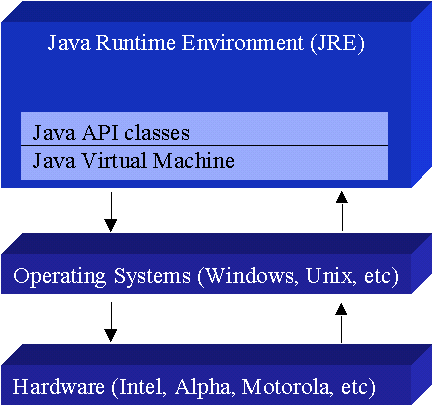
The Java Virtual Machine forms part of a large system, the Java Runtime Environment (JRE). Each operating system and CPU architecture requires a different JRE. The JRE comprises a set of base classes, which are an implementation of the base Java API, as well as a JVM. The portability of Java comes from implementations on a variety of CPUs and architectures. Without an available JRE for a given environment, it is impossible to run Java software.

Functionality of JVM(Java Virtual Machine)

Java sovles the problem of platform independence by usingbyte code.Java complier does not produce native executablecode.
Instead it produces a special format called byte code.Byte code is a highly optimized set of instructionsdesigned to executed by a java runtime system called JavaVirtual Machine(JVM).JVM is an interpreter for byte code.
This interpreter reads or understands the bytecode andexecutes the corresponding native machine instructions.Thus to port java programs to a new platform ,all thatneeded is to port the interperter and some of the libraryroutines.
Even the complier is written in java.The bytecodes are precisely defined and remain the same on allplatforms.The use of byte code  enables the java runtime system toexecute programs much faster.
The JVM is the core of the Java platform and is responsible for:

1. Loading bytecodes from the class files
2. Verifying the loaded byte codes
3. Linking the program with the necessary libraries
4. Memory Management by Garbage Collection
5. Managing calls between the program and the host environment.

Login Authentication using JSP, Servlet, MySQL in JAVA

In this example we will show you how to authenticate and login user against database username and password. This program consists of a JSP page and a Servlet to authenticate the user against database username and password.
User enters the username and password on the JSP page and clicks on the "Sign-In" button. On the form submit event, data is posted to the servlet for authenticating the user. Servlet makes JDBC connection and authenticate the user. Before submitting data to servlet, javascript is ensuring that none of the fields must be empty.
We are using tomcat server for running Servlet and JSP page. You can use any browser to test the application. We are using two files AuthenticLogin.jsp and LoginAuthentication.java and we are making the application in "webapps/JSPMultipleForms" in tomcat server.
Download Source Code 

Installing Apache Tomcat Server in Eclipse IDE

  1. If you do not have Apache Tomcat on your machine, you will first need to download and unzip Apache Tomcat (this scenario was written using Apache Tomcat version 5.0.28, but other versions can be substituted).
  2. Start the Eclipse WTP workbench.
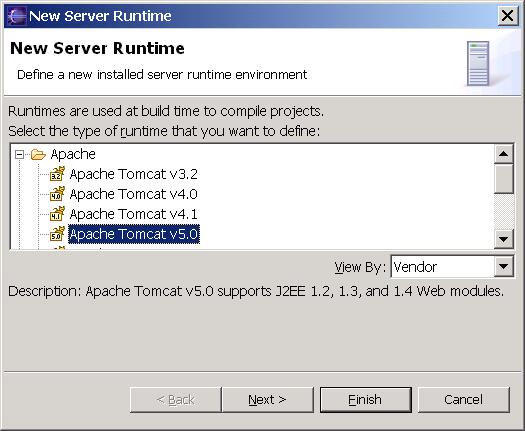
  3. Open Window -> Preferences -> Server -> Installed Runtimes to create a Tomcat installed runtime.
  4. Click on Add... to open the New Server Runtime dialog, then select your runtime under Apache (Apache Tomcat v5.0 in this example):
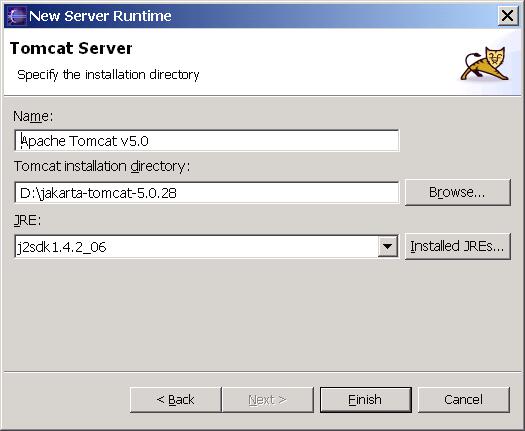
  5. Click Next , and fill in your Tomcat installation directory :
  6. Ensure the selected JRE is a full JDK and is of a version that will satisfy Apache Tomcat (this scenario was written using SUN JDK 1.4.2_06). If necessary, you can click on Installed JREs... to add JDKs to Eclipse.
  7. Click Finish .

Create Installer for Java Application

Today, I came across a good article mentioning how to convert your java application into a installer and distribute it. There is an option to add JRE, obfuscate the code and make .exe of java programme in that.
Read it here

10 Reasons why Ruby is better than PHP

I bet you thought I'd never get any more reasons out did ya? Well, today, I'm going to tell you all about IRB and the Rails command line debugger, both of which I use religiously.
One of the great pleasures of using Ruby, apart from the previous three reasons, and of course the following five reasons, is the wonder that is the Interactive Ruby console, or IRB. IRB is an interactive interpreter; which means that instead of processing a file, it processes what you type in during a session. It's a great tool for testing Ruby code, and a great tool for learning Ruby.
Once you have Ruby installed on your computer, you will notice that the ruby command will do the same thing as PHP - it silently waits for a script to be streamed in on stdin. On it's own, that's not particularly friendly, or even that useful. But another command that is installed alongside Ruby, is the irb command. Start up your command line tool of choice, and simply enter these three immortal letters: irb. Then you will see this:
This is the irb prompt. Now all you do is simply type any ruby code, and it will show you the result of each and every expression as it is evaluated. Not sure how a method works, or can't remember the output of a method? Then test it with IRB.
IRB lets you do things without having to fake out your controller. For example, in PHP, I'm forever using echo or CakePHP's debug function to print out some useful info to the browser when debugging my code. But when developing with Ruby, I simply have my trusty IRB prompt ready and waiting for me to inflict world domination.
Each of the above lines will be following by IRB echoing the result. So I can see exactly what is going on, and without me having to echo out data all through my code and to the browser.
This is actually very, very useful, and is a great way to test your code, or in fact any code at all. It's even better if you are a command line freak like me.
What is even better, better (!?) is that Rails also has its own command line interpreter, which is basically an extension of IRB. What makes it a little different, is that when it is started up, it also loads all your Rails code. So you have instant access to your Rails models, which is also very handy. Just cd to your Rails app root, and run:
You are then shown a similar command line prompt to IRB, and can run any part of your Rails app code.
To wrap up reason #4, I want to tell you about one of the best things about developing with Ruby on Rails. It's another extension of IRB, similar to Rails script/console, but is simply genius when debugging your Rails code.
There are several ways in which you can run your Rails app, but the traditional method is by using the the script/server script within your app. When run on the command line, this will start up a small web server, usually run by Webrick or Mongrel. Now I wouldn't recommend this method when running your app in production, as there are much better, and more efficient ways to do so, but I use this all the time when developing or testing my app code.
Just cd to your Rails app root and run this on the command line:
Notice I appended a command line flag; -u. This tells the Rails server to start up in Debug mode. If you use Mongrel, this is what you will see:
And the command line prompt will sit there blinking at you, waiting for you to load your app in your browser. So don't keep it waiting, open up your browser, and go to http://localhost:3000, and you will be shown your Rails app in all its glory.
Now we get to the good bit. Open up the code of any of your controllers in your favourite IDE or text editor. Then type the word debugger within one of your actions. Then go back your browser and navigate to that page. You should the notice that the page does not appear to finish loading. That is because your debugger keyword within the action method, has paused the server until you tell it to continue.
Go back to your command line when you started the Rails server, and you will see a bunch of log data, following by what looks like an IRB prompt. That is effectively what it is. You can now type any Ruby code at that prompt, just like you would with IRB or script/console. But the beauty of this, is that you have access to all the variables and methods at exactly the same point in your code where you placed the debugger keyword.
So instead of having to type echo or print statements throughout your code, and running them through your browser to see the results. You can add the debugger keywork at the point where you want to debug, and use the command line to access your code in real time.
I really hope you got all that, as this feature has saved me hours and hours of time when debugging my code. I can honestly say that it is a life saver. You really should try it out now, or if you're a little impatient, try it out in your browser for instant gratification. You should also check out Amy Hoy's "Secrets of the Rails Console Ninja's".
Thanks again for sticking with me, and hold on to your pants for reason #5 where I will be talking about Modules; Ruby's answer to name spaces. Which will lead me nicely onto another Ruby exclusive: Mixins!
P.S. I really appreciate everyone's comments. Keep them coming.

Top 10 Reasons to Switch to the NetBeans IDE

  1. Works Out of the Box Simply download and install the NetBeans IDE and you are good to go. Installation is a breeze with its small download size. All IDE tools and features are fully integrated—no need to hunt for plug-ins—and they work together when you launch the IDE.
  2. Free and Open Source When you use the NetBeans IDE, you join a vibrant, open-source community of thousands of users ready to help and contribute. There are discussions on the NetBeans mailing lists, blogs on PlanetNetBeans, and helpful FAQs.
  3. Connected Developer The NetBeans IDE is the tool of choice for teams working in a collaborative environment. You can create and manage Kenai.com-hosted projects, file issue tracking reports using both Jira and Bugzilla, and collaborate with like-minded developers—all directly from within the familiar interface of the IDE.
  4. Powerful GUI Builder The GUI Builder (formerly known as Project Matisse) supports a sophisticated yet simplified Swing Application Framework and Beans Binding. Now you can build GUIs in a natural way.
  5. Support for Java Standards and Platforms The IDE provides end-to-end solutions for all Java development platforms including the latest Java standards.
    • Java Mobility Support Complete environment to create, test, and run applications for mobile devices. With preprocessor blocks, you can readily handle fragmentation issues. Support for Java Mobility development is the best among all Java development tools.
    • Java Enterprise Edition (EE) 6 support: The first free, open-source IDE to support Java EE 6 specifications.
    • Java Standard Edition (SE) Support: You can develop applications using the latest Java SE standards.
  6. Profiling and Debugging Tools With NetBeans IDE profiler, you get realtime insight into memory usage and potential performance bottlenecks. Furthermore, you can instrument specific parts of code to avoid performance degradation during profiling. The HeapWalker tool helps you evaluate Java heap contents and find memory leaks.

  7. Dynamic Language Support The NetBeans IDE provides integrated support for scripting languages such as Ruby and Ruby on Rails, PHP, Groovy, JavaScript, JavaFX and Python.
    • PHP: With the NetBeans IDE for PHP, you get the best of both worlds: the productivity of an IDE (code completion, real-time error checking, debugging and more) with the speed and simplicity of your favorite text editor in a less than 30mb download.
    • Ruby and Ruby on Rails Support: Both native Ruby and JRuby development on Rails are available. You can switch easily between the two. The sophisticated Ruby editing capabilities makes it easy to create and modify Ruby applications.
    • JavaScript: The NetBeans IDE has the JavaScript tools you need: an intelligent JavaScript editor, CSS/HTML code completion, the ability to debug JavaScript in Firefox and IE, and bundled popular JavaScript libraries. Your favorite JavaScript framework will get you 80% of the way, NetBeans IDE will help you with that last 20%.
    • Groovy: In the NetBeans IDE, you can now create Grails applications, integrate Groovy scripts with your JavaSE project.
    • JavaFX: The NetBeans IDE is the official tool for JavaFX development! See your visual code live in the editor, and analyze your application's performance with the JavaFX Profiler.
    • Python: Discover the joys of Python programming with the NetBeans IDE. Enjoy great editor features such as code completion, semantic highlighting, and more.
  8. Extensible Platform Start with its extensible platform and add your own NetBeans IDE features and extensions or build an IDE-like application, keeping only features you want. Extending the platform and its Swing-based foundation saves development time and can optimize performance.
  9. Customizable Projects Through the NetBeans IDE build process, which relies on industry standards such as Apache Ant, make, Maven, and rake, rather than a proprietary build process, you can easily customize projects and add functionality. You can build, run, and deploy projects to servers outside of the IDE.
  10. Non-Java Code Support You're not limited to the Java programming language. You can include many other programming languages, such as C/C++, scripting languages like JavaScript, Ruby, etc. Even more exciting, define your own language and include it in your projects.

Top Ten Errors Java Programmers Make


Whether you program regularly in Java, and know it like the back of your hand, or whether you're new to the language or a casual programmer, you'll make mistakes. It's natural, it's human, and guess what? You'll more than likely make the same mistakes that others do, over and over again. Here's my top ten list of errors that we all seem to make at one time or another,  how to spot them, and how to fix them.

10. Accessing non-static member variables from static methods (such as main)

Many programmers, particularly when first introduced to Java, have problems with accessing member variables from their main method. The method signature for main is marked static - meaning that we don't need to create an instance of the class to invoke the main method. For example, a Java Virtual Machine (JVM) could call the class MyApplication like this :-
MyApplication.main ( command_line_args );
This means, however, that there isn't an instance of MyApplication - it doesn't have any member variables to access! Take for example the following application, which will generate a compiler error message.
public class StaticDemo
{
        public String my_member_variable = "somedata";
public static void main (String args[])
        {
  // Access a non-static member from static method
                System.out.println ("This generates a compiler error" +
   my_member_variable );
        }
}
If you want to access its member variables from a non-static method (like main), you must create an instance of the object. Here's a simple example of how to correctly write code to access non-static member variables, by first creating an instance of the object.
public class NonStaticDemo
{
        public String my_member_variable = "somedata";

        public static void main (String args[])
        {
                NonStaticDemo demo = new NonStaticDemo();

  // Access member variable of demo
                System.out.println ("This WON'T generate an error" +
                        demo.my_member_variable );
        }
}

9. Mistyping the name of a method when overriding

Overriding allows programmers to replace a method's implementation with new code. Overriding is a handy feature, and most OO programmers make heavy use of it. If you use the AWT 1.1 event handling model, you'll often override listener implementations to provide custom functionality. One easy trap to fall into with overriding, is to mistype the method name. If you mistype the name, you're no longer overriding a method - you're creating an entirely new method, but with the same parameter and return type.
public class MyWindowListener extends WindowAdapter {
 // This should be WindowClosed
 public void WindowClose(WindowEvent e) {
  // Exit when user closes window
  System.exit(0);
 }
});
Compilers won't pick up on this one, and the problem can be quite frustrating to detect. In the past, I've looked at a method, believed that it was being called, and taken ages to spot the problem. The symptom of this error will be that your code isn't being called, or you think the method has skipped over its code. The only way to ever be certain is to add a println statement, to record a message in a log file, or to use good trace debugger (like Visual J++ or Borland JBuilder) and step through line by line. If your method still isn't being called, then it's likely you've mistyped the name.

8. Comparison assignment (  = rather than == )

This is an easy error to make. If you're used other languages before, such as Pascal, you'll realize just how poor a choice this was by the language's designers. In Pascal, for example, we use the := operator for assignment, and leave = for comparison. This looks like a throwback to C/C++, from which Java draws its roots.
Fortunately, even if you don't spot this one by looking at code on the screen, your compiler will. Most commonly, it will report an error message like this : "Can't convert xxx to boolean", where xxx is a Java type that you're assigning instead of comparing.

7. Comparing two objects ( == instead of .equals)

When we use the == operator, we are actually comparing two object references, to see if they point to the same object. We cannot compare, for example, two strings for equality, using the == operator. We must instead use the .equals method, which is a method inherited by all classes from java.lang.Object.
Here's the correct way to compare two strings.
String abc = "abc"; String def = "def";

// Bad way
if ( (abc + def) == "abcdef" )
{
    ......
}
// Good way
if ( (abc + def).equals("abcdef") )
{
   .....
}

6. Confusion over passing by value, and passing by reference

This can be a frustrating problem to diagnose, because when you look at the code, you might be sure that its passing by reference, but find that its actually being passed by value. Java usesboth, so you need to understand when you're passing by value, and when you're passing by reference.
When you pass a primitive data type, such as a char, int, float, or double, to a function then you are passing by value. That means that a copy of the data type is duplicated, and passed to the function. If the function chooses to modify that value, it will be modifying the copy only. Once the function finishes, and control is returned to the returning function, the "real" variable will be untouched, and no changes will have been saved. If you need to modify a primitive data type, make it a return value for a function, or wrap it inside an object.
When you pass a Java object, such as an array, a vector, or a string, to a function then you arepassing by reference. Yes - a String is actually an object, not a primitive data type.  So that means that if you pass an object to a function, you are passing a reference to it, not a duplicate. Any changes you make to the object's member variables will be permanent - which can be either good or bad, depending on whether this was what you intended.
On a side note, since String contains no methods to modify its contents, you might as well be passing by value.

5. Writing blank exception handlers

I know it's very tempting to write blank exception handlers, and to just ignore errors. But if you run into problems, and haven't written any error messages, it becomes almost impossible to find out the cause of the error. Even the simplest exception handler can be of benefit. For example, put a try { .. } catch Exception around your code, to catch ANY type of exception, and print out the message. You don't need to write a custom handler for every exception (though this is still good programming practice). Don't ever leave it blank, or you won't know what's happening.
For example
public static void main(String args[])
{
    try {
 // Your code goes here..
    }
    catch (Exception e)
    {
 System.out.println ("Err - " + e );
    }
}

4. Forgetting that Java is zero-indexed

If you've come from a C/C++ background, you may not find this quite as much a problem as those who have used other languages. In Java, arrays are zero-indexed, meaning that the first element's index is actually 0. Confused? Let's look at a quick example.
// Create an array of three strings
String[] strArray = new String[3];

// First element's index is actually 0
strArray[0] = "First string";

// Second element's index is actually 1
strArray[1] = "Second string";

// Final element's index is actually 2
strArray[2] = "Third and final string";
In this example, we have an array of three strings, but to access elements of the array we actually subtract one. Now, if we were to try and access strArray[3], we'd be accessing the fourth element. This will case an ArrayOutOfBoundsException to be thrown - the most obvious sign of forgetting the zero-indexing rule.
Other areas where zero-indexing can get you into trouble is with strings. Suppose you wanted to get a character at a particular offset within a string. Using the String.charAt(int) function you can look this information up - but under Java, the String class is also zero-indexed. That means than the first character is at offset 0, and second at offset 1. You can run into some very frustrating problems unless you are aware of this - particularly if you write applications with heavy string processing. You can be working on the wrong character, and also throw exceptions at run-time. Just like the ArrayOutOfBoundsException, there is a string equivalent. Accessing beyond the bounds of a String will cause a StringIndexOutOfBoundsException to be thrown, as demonstrated by this example.
public class StrDemo
{
 public static void main (String args[])
 {
        String abc = "abc";

        System.out.println ("Char at offset 0 : " + abc.charAt(0) );
        System.out.println ("Char at offset 1 : " + abc.charAt(1) );
        System.out.println ("Char at offset 2 : " + abc.charAt(2) );

 // This line should throw a StringIndexOutOfBoundsException
        System.out.println ("Char at offset 3 : " + abc.charAt(3) );
 }
}
Note too, that zero-indexing doesn't just apply to arrays, or to Strings. Other parts of Java are also indexed, but not always consistently. The java.util.Date, and java.util.Calendar classes start their months with 0, but days start normally with 1. This problem is demonstrated by the following application.
import java.util.Date;
import java.util.Calendar;

public class ZeroIndexedDate
{
        public static void main (String args[])
        {
                // Get today's date
                Date today = new Date();
 
  // Print return value of getMonth
  System.out.println ("Date.getMonth() returns : " +
    today.getMonth());

  // Get today's date using a Calendar
  Calendar rightNow = Calendar.getInstance();

  // Print return value of get ( Calendar.MONTH )
  System.out.println ("Calendar.get (month) returns : " +
   rightNow.get ( Calendar.MONTH ));
}
}
Zero-indexing is only a problem if you don't realize that its occurring. If you think you're running into a problem, always consult your API documentation.

3. Preventing concurrent access to shared variables by threads

When writing multi-threaded applications, many programmers (myself included) often cut corners, and leave their applications and applets vulnerable to thread conflicts. When two or more threads access the same data concurrently, there exists the possibility (and Murphy's law holding, the probability) that two threads will access or modify the same data at the same time. Don't be fooled into thinking that such problems won't occur on single-threaded processors. While accessing some data (performing a read), your thread may be suspended, and another thread scheduled. It writes its data, which is then overwritten when the first thread makes its changes.
Such problems are not just limited to multi-threaded applications or applets. If you write Java APIs, or JavaBeans, then your code may not be thread-safe. Even if you never write a single application that uses threads, people that use your code WILL. For the sanity of others, if not yourself, you should always take precautions to prevent concurrent access to shared data.
How can this problem be solved? The simplest method is to make your variables private (but you do that already,  right?) and to use synchronized accessor methods. Accessor methods allow access to private member variables, but in a controlled manner. Take the following accessor methods, which provide a safe way to change the value of a counter.
public class MyCounter
{
 private int count = 0; // count starts at zero

 public synchronized void setCount(int amount)
 { 
  count = amount;
 }
 
 public synchronized int getCount()
 {
  return count;
 }
}

2. Capitalization errors

This is one of the most frequent errors that we all make. It's so simple to do, and sometimes one can look at an uncapitalized variable or method and still not spot the problem. I myself have often been puzzled by these errors, because I recognize that the method or variable does exist, but don't spot the lack of capitalization.
While there's no silver bullet for detecting this error, you can easily train yourself to make less of them. There's a very simple trick you can learn :-
  • all methods and member variables in the Java API begin with lowercase letters
  • all methods and member variables use capitalization where a new word begins e.g - getDoubleValue()
If you use this pattern for all of your member variables and classes, and then make a conscious effort to get it right, you can gradually reduce the number of mistakes you'll make. It may take a while, but it can save some serious head scratching in the future.

(drum roll)

And the number one error that Java programmers make !!!!!


1. Null pointers!

Null pointers are one of the most common errors that Java programmers make. Compilers can't check this one for you - it will only surface at runtime, and if you don't discover it, your users certainly will.
When an attempt to access an object is made, and the reference to that object is null, a NullPointerException will be thrown. The cause of null pointers can be varied, but generally it means that either you haven't initialized an object, or you haven't checked the return value of a function.
Many functions return null to indicate an error condition - but unless you check your return values, you'll never know what's happening. Since the cause is an error condition, normal testing may not pick it up - which means that your users will end up discovering the problem for you. If the API function indicates that null may be returned, be sure to check this before using the object reference!
Another cause is where your initialization has been sloppy, or where it is conditional. For example, examine the following code, and see if you can spot the problem.
public static void main(String args[])
{
 // Accept up to 3 parameters
 String[] list = new String[3];

 int index = 0;

 while ( (index < args.length) && ( index < 3 ) )
 {
  list[index++] = args[index];
 }

 // Check all the parameters 
 for (int i = 0; i < list.length; i++)
 {
  if (list[i].equals "-help")
  {
   // .........
  }
  else
  if (list[i].equals "-cp")
  {
   // .........
  }
  // else .....
 } 
}
This code (while a contrived example), shows a common mistake. Under some circumstances, where the user enters three or more parameters, the code will run fine. If no parameters are entered, you'll get a NullPointerException at runtime. Sometimes your variables (the array of strings) will be initialized, and other times they won't. One easy solution is to check BEFORE you attempt to access a variable in an array that it is not equal to null.

Summary

These errors represent but some of the many that we all make. Though it is impossible to completely eliminate errors from the coding process, with care and practice you can avoid repeating the same ones. Rest assured, however, that all Java programmers encounter the same sorts of problems. It's comforting to know, that while you work late into the night tracking down an error, someone, somewhere, sometime, will make the same mistake!
What is hybernate and spring?

Hibernate offers persistence and OR(Objet-Relational) mapping for Java/J2EE applications helping them improve performance and scalability.Spring is a light-weight Java framework which paves the way to write faster applications without App Server (or EJB etc.)There are a plenty of good books on these subjects. Following the most notable amongst them:Hibernate in Action by Christian Bauer, Gavin King (Hanning)Better, Faster, Lighter Java by Justin Gehtland, Bruce A. Tate ( O'Reilly)

Abstract Class or Method


Question:
Can we make use of "this" keyword reference inside a abstract method or Abstract Method?
Answer:
Yes You Can do that
For Example:
public abstract class TestExample{

private String exampleid;

private String examplename;

public TestExample(String exampleid ,String examplename)

{

this.exampleid= exampleid;

this.examplename= examplename;

}

//public gettors and settors

public abstract void scheduleTest();

}


public class JavaTestExample extends TestExample

{

private String typeName;

public JavaTestExample(String exampleid, String examplename, String typeName)

{

super(exampleid, examplename);

this.typeName =typeName;

}

public void scheduleTest()

{

//do Stuff

}

}


A class has a constructor so that when an instance of the Class is created
the fields of the class can be setup to a initial valid state.

Abstract classes define partial implementation of a public contract. Which
means that it may implement some of the methods and contains partially
implemented methods that are marked abstract.

Since abstract classes can have partial implementation and such partial
implementation can include fields of the class a constructor becomes necessary
so that those fields are initialized to a valid default state when they are
created thru the constructor of their concrete subclasses.

All abstract class are not pure abstract partially they are. So if you
need a pure abstract class go for an Interface.