Showing posts with label Microsoft. Show all posts

Four in 10 Small Businesses Planning Cloud Computing, Says Microsoft

About Cloud Computing:

The term “cloud” is used as a metaphor for the internet, but what happens when you combine it with “computing?” Cloud computing makes infrastructure, applications, and business processes accessible entirely on the internet without breaking your budget or cloning your IT department.


Almost 40 percent of SMEs expect to be paying for one or more cloud services within three years, according to a Microsoft report.

View the full article on Four in 10 Small Businesses Planning Cloud Computing, Says Microsoft here

How to Check What Version of Microsoft .NET Framework is Installed using Registry Editor

Method 1 : Using Registry Editor:
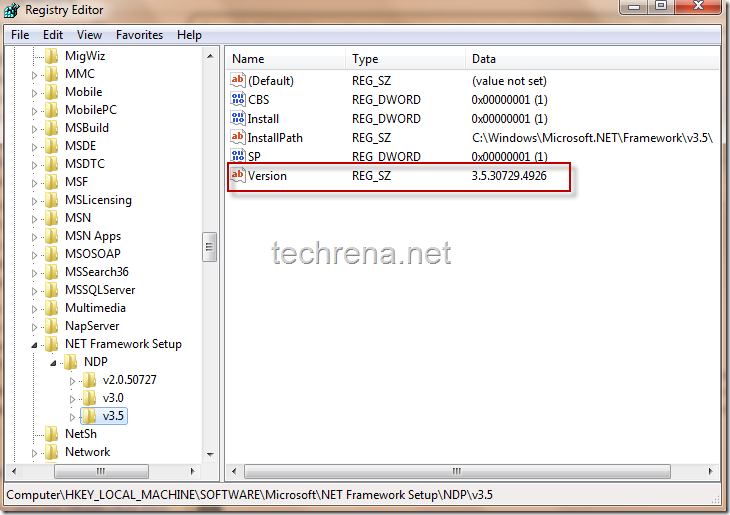
f you are familiar with Windows registry editor (by using regedit command), this should be the easier way to find the version of .NET installed.You just have to navigate to the following registry path and check the value present for the key entry “Version” (which is 3.5.30729… in my case) as shown below.
Path: HKEY_LOCAL_MACHINE\ SOFTWARE\ MICROSOFT\ NET Framework Setup\ NDP\ v3.5
Net Framework Version Registry Key

How to create a moving a pictureBox right till it hits another PixelBox in VB.net?

Im trying to make a ball move from the left side of the form to the right until it hits another PixelBox can any one suggest how to do it?

Answer:
Well, the first step is getting the ball to move, at a steady pace. So to do this we will use the timer control, click and drag a timer onto the form, then set the interval property to 100 or so (depending on how fast you want the ball to move). Then make sure it is enabled, and double click on it to create the tick event. In the tick event:

ball.Left = ball.Left + 1

Depending on how fast you want it to go, change the number one to something higher (the smaller this number the smoother the movement, it's better to put the timer interval down lower, if you want speed). Then we want to check if this new move means it's hit the other picture box, so right after moving it:

If ball.Left + ball.Width > otherpicturebox.Left And ball.Top + ball.Height > otherpicturebox.Top And ball.Left < otherpicturebox.Left + otherpicturebox.Width And ball.Top < otherpicturebox.Top + otherpicturebox.Height Then
Timer1.Enabled = False
MsgBox("I've hit the other picture box")
End If

Microsoft Surface Diagram: How it all works

The Microsoft Surface is a revolutionary piece of equipment that has basically brought the major film Minority Report to life, we never imagined something so futuristic would be here with is in 2007. This is heaven to us and we guess it is to you as well, the way this new Touch Surface high tech table works is mind blowing but below we have 4 simple steps of how the Microsoft Surface works.
Microsoft Surface Diagram
1) Screen –
• There is a diffuser which turns the Surface’s acrylic tabletop into a large horizontal “multitouch” screen, which is capable of processing multiple inputs from multiple users. The Surface is so far advanced than we could imagine that it can recognize objects by their shapes or by reading coded “domino” tags when placed on the table.
2) Infrared –
• Surface’s “machine vision” operates in the near-infrared spectrum, using an 850-nanometer-wavelength LED light source aimed at the screen. When objects touch the tabletop, the light reflects back and is picked up by multiple infrared cameras with a net resolution of 1280 x 960.
3) CPU –
• Surface uses many of the same components found in everyday desktop computers — a Core 2 Duo processor, 2GB of RAM and a 256MB graphics card. Wireless communication with devices on the surface is handled using WiFi and Bluetooth antennas (future versions may incorporate RFID or Near Field Communications). The underlying operating system is a modified version of Microsoft Vista.
4) Projector -
• Microsoft’s Surface uses the same DLP light engine found in many rear-projection HDTV’s. The footprint of the visible light screen, at 1024 x 768 pixels, is actually smaller than the invisible overlapping infrared projection to allow for better recognition at the edges of the screen.

Difference Between OLE Controls and ActiveX Controls

Difference Between OLE Controls and ActiveX Controls
ActiveX:
ActiveX is a technology developed by Microsoft. With an ActiveX-enabled browser (ie Internet Explorer only) ActiveX controls can be downloaded as part of a Web document to add functionality to the browser (similar to Java applets). In particular ActiveX enables seamless viewing of Windows files of all types, eg spreadsheets, and in combination with other technologies such as Java and scripting languages, makes possible the development of complex Web applications. ...

OLE: Object Linking and Embedding. Microsoft technology that enables the creation of documents by incorporating elements created using different kinds of software.

Differences Between Visual Basic .NET and Visual C# .NET

Although there are differences between Visual Basic .NET and Visual C# .NET, both are first-class programming languages that are based on the Microsoft .NET Framework, and they are equally powerful. Visual Basic .NET is a true object-oriented programming language that includes new and improved features such as inheritance, polymorphism, interfaces, and overloading. Both Visual Basic .NET and Visual C# .NET use the common language runtime. There are almost no performance issues between Visual Basic .NET and Visual C# .NET. Visual C# .NET may have a few more "power" features such as handling unmanaged code, and Visual Basic .NET may be skewed a little toward ease of use by providing features such as late binding. However, the differences between Visual Basic .NET and Visual C# .NET are very small compared to what they were in earlier versions.
The following file is available for download from the Microsoft Download Center:

Download the "Differences between Microsoft Visual Basic .NET and Microsoft Visual C# .NET" white paper package now

Microsoft offers first Google Android mobile phone app

http://newsimg.bbc.co.uk/media/images/47411000/jpg/_47411609_msandroid-afp226.jpg.jpg 
Microsoft has made an application that works with Google's Android phone.
Called Tag, the free software uses a handset's camera to turn it into a mobile barcode reader.
It is the first application Microsoft has made for the Android operating system - one of the key rivals to Windows Mobile.
Android is among the last to get the Tag application which is available on Windows phones, the iPhone, Blackberry and Symbian handsets.
Using Tag and similar programs, barcodes can become coupons that link people to websites, pass on information or give visitors a discount in an online store.
Releasing the application for Android continues Microsoft's program of making software for rival phone firm. In December 2008 it produced its first iPhone app, called Seadragon, and followed it up in early 2009 by releasing Tag for the Apple handset

Microsoft: Don't press F1 Key in Windows XP

 Microsoft told Windows XP users today not to press the F1 key when prompted by a Web site, as part of its reaction to an unpatched vulnerability that hackers could exploit to hijack PCs running Internet Explorer (IE).In a security advisory issued late Monday, Microsoft confirmed the unpatched bug in VBScript that Polish researcher Maurycy Prodeus had revealed Friday, offered more information on the flaw and provided some advice on how to protect PCs until a patch shipped."The vulnerability exists in the way that VBScript interacts with Windows Help files when using Internet Explorer," read the advisory. "If a malicious Web site displayed a specially crafted dialog box and a user pressed the F1 key, arbitrary code could be executed in the security context of the currently logged-on user."

KDE Software Compilation 4.4.0 Introduces Netbook Interface, Window Tabbing and Authentication Framework

KDE announces the immediate availability of the KDE Software Compilation 4.4, "Caikaku", bringing an innovative collection of applications to Free Software users. Major new technologies have been introduced, including social networking and online collaboration features, a new netbook-oriented interface and infrastructural innovations such as the KAuth authentication framework. According to KDE's bug-tracking system, 7293 bugs have been fixed and 1433 new feature requests were implemented. The KDE community would like to thank everybody who has helped to make this release possible.
Read the Official KDE SC 4.4.0 Announcement and the Visual Guide To KDE Software Compilation 4.4 for more details on the improvements in 4.4.

Oracle buying Sun will change the IT industry

1) MySQL is dead. Long live MySQL. Oracle doesn't have much to say about MySQL. Why should they? They're going to quietly kill the open-source DBMS as fast as possible.

Unfortunately for Oracle, it's too late. MySQL, under Sun's mismanagement, had already forked. MySQL founder, Michael 'Monty' Widenius left Sun and started his own community branch of MySQL, MariaDB. His purpose? "To provide a community developed, stable, and always Free branch of MySQL that is, on the user level, compatible with the main version."

That's one of the things that Ellison, and Microsoft for that matter, don't get. You can't kill open-source projects. Companies come and go, but popular open-source programs like MySQL just keep rolling on.

2) Solaris/OpenSolaris. Oracle is making sounds like it wants to do something with Solaris. Just don't ask me what. Solaris has been declining for years. Oracle uses Linux internally, and it even has its own rip-off of RHEL (Red Hat Enterprise Linux), Oracle Unbreakable Linux.

Ellison can talk all he wants about Sun's Solaris operating system being "by far the best Unix technology," but so what? Unix is dying. Linux has been eating away at the Unix market for more than a decade. Ellison's support of Unix makes a good sound-bite, but as a business move it makes no sense. I predict death by neglect for Solaris.

3) Java. Java has value, but Sun's done a poor job over the years of turning that value into money. Oracle, which uses Java in many of its applications, can certainly put Java to good work in supporting its own products. My question is, "What is Oracle going to do with the Java Community and vice-versa?"

I know some things will happen. NetBeans, for example, is history. Oracle is a big-time Eclipse supporter. As for the rest? I honestly don't know what Oracle will do with the JCP (Java Community Process). If they're smart, they'll get everyone together as soon as possible to spell out their future plans for Java. If Oracle doesn't, they'll have Java developers running, not walking, away from the Sun/Oracle Java as fast as they can.

4) SPARC. Oracle can talk all it wants about taking a step back to the past where companies sell hardware and software bundles, but I don't see it. Fujitsu will continue to make SPARC boxes for that dwindling market, and I expect to see Sun's x86-server based business getting either spun out as an independent company or sold to Dell or HP. I just can't see Oracle in the hardware business.

5) Sun's other open-source programs. I have a bad, bad feeling that Oracle is going to let popular and powerful open-source projects like OpenOffice and VirtualBox wither on the vine. Oracle is willing to spend money on open-source projects that it uses. For example, Oracle is a top contributor to ldLinux. But, I don't see these, or Sun's other open-source projects, contributing to Oracle's bottom-line, so I don't see them getting much support.

Over the years, Sun has contributed, albeit reluctantly at times, many great advances in operating systems and open-source software. With this acquisition, those days are done. Good-bye Sun, it was nice to have known you.
Courtesy:ComputerWorld

Microsoft Launches Visual Studio 2010 Beta 2

Microsoft has announced the availability of Microsoft Visual Studio 2010 Beta 2 and Microsoft .NET Framework 4 Beta 2 to Microsoft Developer Network (MSDN) subscribers.
Microsoft will shed more light on Visual Studio 2010, .NET Framework 4 and all of its other developer technologies at its upcoming Microsoft Professional Developers Conference (PDC) to be held in Los Angeles November 17-19
What’s New with Beta 2
With this release the Web Tools team has introduced a number of great improvements. A number of these improvements are listed below.
New Template

Using the default ASP.NET web site template, projects now come with a pre-configured site. This template configures your site to use master and content pages. In addition, it has styles pre-defined and controls for login, register and changing your password.

Silverlight 3 Tooling Support
While Dev10 tooling for Beta 1 has Silverlight 2 features that worked with Silverlight 3, Beta 2 now re-introduces all the Silverlight 3 features directly into Visual Studio.

Changes include:
  1. Support for configuring Out of browser (see screenshot below).
  2. Support for Transparent Platform Extensions.
  3. Page.xaml renamed to MainPage.xaml.
  4. Removal of support for Silverlight 
Parameterization of Web Packages 
VS will automatically parameterize the connection strings defined in the web.config and the destination virtual application name.  The users can specify customized parameters in parameters.xml file in the project directory as well, to parameterize configurations, such as WCF service’s end point etc. 

Import from web.config file for DB deployment Web application’s Deploy SQL property page provided a button “Import from web.config”, which will import the web.config connection string names to the connection list, with the connection strings as their package source. 

Microsoft To Purge Search Data on Bing After 6 Months

Microsoft's Bing blog announced they will reduce the time frame they store search data, from 18 months to only 6 months. This is in response to the European Union's request that search companies reduce the time they store such data. Microsoft Bing is the first major search engine to comply with those demands.
According to bing..
Specifically, we are reducing the amount of time we store IP addresses from searchers to 6 months. Currently we keep that information for 18 months before we delete it. Generally, when Bing receives search data we do a few things: first, we take steps to separate your account information (such as email or phone number) from other information (what the query was, for example). Then, after 18 months we take the additional step of deleting the IP address and any other cross session IDs associated with the query. Under the new policy, we will continue to take all the steps we applied previously – but now we will remove the IP address completely at 6 months, instead of 18 months. We think this gives us the right balance between making search better for consumers (we use the data to improve the service we offer) and providing greater protection for the privacy of our users.

Top 5 Web Technology Trends for 2009

Here are 5 additional web technology trends that will be important in 2009, in no particular order:
  1. Actionable Web Analytics as part of Enterprise BI and Dashboards.
    Web Analytics in many organizations is still an orphan with no real parents. Every department looks at its data but rarely does it get a strategic priority as an indicator of business trends and business intelligence asset. Investment in web analytics allows for customer insights, marketing spend ROI, conversion optimization and can impact the bottom line. As companies invest in sophisticated BI and analytical dashboards, web based data that is not transactional is usually not there. Integrating web traffic and user interest data into these systems can result in new insights and better actionable data.
  2. Phone Browser Compatibility
    Mobile computing is booming. About 13M iPhones were sold so far, and the support for location and browser that both the Android, Blackberry and all Microsoft based smartphones are offering, the percentage of traffic to web sites coming from phones is already in the 3%-10% range and will only increase. These are not the early 00’s WAP/WML jokes but full HTML browsers. Still, these special browsers are very different from the full version used on PC’s and Laptops. Bandwidth is still a challenge and their support for Rich Applications such as Flash and Silverlight is lacking. If you have a fancy Flash based site, your users will most likely not see a thing. Companies that have ignored it so far will have to adjust their sites or redirect mobile traffic to a mirror mobile optimized site.
  3. Location based services
    Continuing from the previous point, these mobile devices have GPS included and location based applications can drastically impact the user experience. Either as an iPhone/Android application or websites, the ability to share location information and get back location specific data about local services, other people, events, sales or anything else adds a new dimension to mobile applications.
  4. Increased reliance on open source infrastructure products and technologies
    Free is always a powerful word. Strong and reliable open source environments allow companies to create a robust e-commerce infrastructure with little or no proprietary platforms. The excellent Apache OFBiz for example, provides strong open source modules for e-commerce, ERP, CRM and many others. Alfresco offers a great content management solution and multiple open source development environments are available. The case for Enterprise Open Source web environment is getting stronger every day.
  5. Approaching Social Networking and Collaboration in a Strategic way
    Everyone now realizes the power of social networks and is rushing to get in, establish a FaceBook page, a Twitter account and get’s their PR to sprawl the web to “engage” people. Internally, companies are haphazardly trying various collaboration methods. We see a maturity process happening through 2009 that will force companies to look at all their collaboration points in a strategic way and tie them to business goals and processes. This new approach will transform them from toys to tools and will establish their place and value in the new order.

H-P, Microsoft To Spend $250M In Effort To Simplify IT Management

Hewlett-Packard Co. (HPQ) and Microsoft Corp. (MSFT) unveiled details of a three-year pact to spend $250 million in an effort to help simplify information-technology systems.
The tech titans say they plan to invest an additional $250 million into developing new products around the Microsoft Windows Azure platform, with the companies offering services and Microsoft continuing to invest in H-P hardware for the Azure infrastructure.
The two tech giants said they will collaborate in designing a full "stack" of data center hardware, software management tools and other applications, as well as on Windows Azure, which is Microsoft's operating platform for cloud computing, in which customers can access data center services over the Internet. 

Microsoft sheds its 'Dr. Evil' costume

The problem with characterizing any kind of business, including information technology, as "war" is that it immediately polarizes the opinions not only of the war's practitioners but also of its observers. Once an enemy is formally declared, the concept of "If you're not with us, you're against us" becomes self-fulfilling.

Inevitably, since everyone's hands emerge equally bloodied, the original, unifying sense of polarity that marked the outset of the war, becomes lost. Any ethic or principal or qualitative substance that characterized one side from the other(s), is usually compromised. Before long, people forget what it was they were fighting for, or fighting against. And often, the war gets cancelled for lack of funds.
Courtesy:Beta News

7 reasons why Microsoft must buy Palm

1. Palm would be cheap and a much more sensible purchase than Research in Motion.
2. WebOS is a modern, mobile operating system.
3. Palm got sync right.
4. WebOS ships with a decent browser.
5. Google plans an event next week where the Nexus One may be launched.
6. Palm technology would generate excitement about Microsoft's mobile strategy.
7. Microsoft can immediately sell a branded phone without directly competing with hardware partners.

Top 3 things that microsoft couldn't explain

Hi All....
Found this one really Amazing!!..Thought u also wud enjoy!!!


There are three techy things that Microsoft couldn't Explain till now...what are those are they bugs?..
lollll
here goes the three


Bug 1:
An Indian found that nobody can create a FOLDER anywhere on the Computer which can be named as "CON". This is something funny and inexplicable? At Microsoft the whole Team, couldn't answer why this happened!TRY IT NOW, IT WILL NOT CREATE A "CON" FOLDER


Bug2
For those of you using Windows, do the following:
1.) Open an empty notepad file
2.) Type "Bush hid the facts" (without the quotes)
3.) Save it as whatever you want.
4.) Close it, and re-open it.
Noticed the weird bug? No one can explain!


Bug 3:
Again this is something funny and can't be explained? At Microsoft the whole Team, including Bill Gates, couldn't answer why this happened!It was discovered by a Brazilian. Try it out yourself?
Open Microsoft Word and type=rand (200, 99)And then press ENTERAnd see the magic?..!